AI Essentials for Investigative Intelligence | 6-Part Video Series
Images and video have become a dominant form of data in law enforcement and intelligence work. The challenge is making sense of it all before the trail goes cold. Between mobile devices, body-worn cameras, surveillance systems, and open-source platforms, the volume has outpaced what any team can realistically review.
In Part 3 of our AI Essentials for Investigative Intelligence series, we explore how AI-powered computer vision (CV) helps teams cut through that volume, accelerating the triage and prioritization of relevant footage while keeping human judgment, governance, and accountability at the center of the workflow.
Hi there. I’m Sean, and I’m a Senior AI Product Manager at JSI. This is Part 3 of our AI Essentials for Investigative Intelligence video series, where we examine the core AI capabilities that matter for investigative work, highlighting where they add value and sharing key considerations for their use. This episode focuses on computer vision.
Before we dive in, let’s briefly review what we’ve covered so far, and what’s coming next. So far, we’ve looked at the data challenges investigative teams face and how natural language processing tools can help make sense of language-based communications. If you missed those earlier episodes, I recommend starting there.
In this part, we’ll shift to the next major AI subfield: computer vision. We’ll break down what it is and how it can help investigators process images and videos at scale. Next, we’ll move on to generative AI.
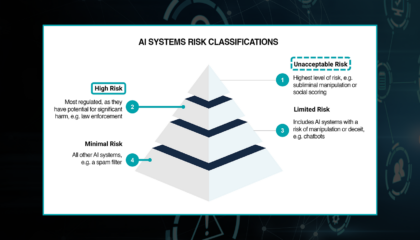
In Part 5, we’ll look at how these capabilities come together in emerging AI systems designed for real-world workflows. Finally, we’ll wrap up the series with a discussion on compliance and ethics within investigative environments. Now, let’s dive into computer vision and see why it’s becoming essential for public safety operations.
Computer vision is a subfield of artificial intelligence focused on helping computers understand the visual world; images, videos, and anything we can perceive with our own eyesight.
The goal is to interpret visual information the way a person would: recognizing objects, spotting patterns, and drawing conclusions from what it “sees.” In other words, it’s a digital version of human vision; we’re teaching computers not just to look at visual data, but to make sense of it and support decisions based on what’s happening in that imagery.
Computer vision becomes incredibly powerful when applied to the kinds of visual data investigators deal with every day. In mobile forensics, it can rapidly scan entire photo libraries and spot indicators like weapons, locations, or symbols. In messaging apps, it can help triage shared images by automatically recognizing risky or relevant content.
In surveillance video, such as CCTV, body-worn camera footage, or drone video, it can help detect activity and objects, highlight unusual patterns across long recordings, and surface key visual details from otherwise chaotic environments.
And in OSINT, computer vision can sift through large volumes of online images and videos to identify visuals tied to people, objects, or events of interest. Across all of these sources, the goal is the same: turn massive amounts of visual data into fast, actionable insight.
Next, let’s look at a few tools in the computer vision toolbox; capabilities you may encounter across different offerings in an investigative environment. One of the most common tools is object detection.
Traditionally, object detection models are trained on large datasets of labeled examples; cars, people, bicycles, traffic lights, and so on, which forms the foundation for predicting where those objects might be located in new content and surfacing the results to end users.
These models can also be fine-tuned for law enforcement and intelligence use cases, such as more reliably identifying firearms or other objects of interest in collected content.
A key consideration with object detection is the quality and type of training data behind the model. It’s one thing to detect a clearly visible object in a high-quality photo, but it can be much harder to detect small or partially obscured objects in lower-resolution footage like CCTV.
If you plan to run object detection on CCTV, you’ll typically get better results from a model trained on CCTV-like data that includes the objects you care about.
Another parallel capability is facial recognition. This can be especially useful in law enforcement and intelligence workflows when you need to find a person of interest across a broad set of collected data from many disparate sources.
Typically, you collect data and label example faces you care about. As new data comes in, the system detects faces and compares them to those labeled examples, producing a similarity (or confidence) score that reflects how closely a detected face matches what you’ve labeled.
Teams then choose thresholds, deciding when a match is strong enough to automatically link, and when it’s too uncertain and should be reviewed or discarded.
Facial recognition doesn’t have to be used only for identifying who someone is. The same underlying approach can be adapted to detect or classify other facial attributes that matter to your workflow. The broader point is that these models can be trained to look for different things based on the attributes that are relevant to your use case.
Another important tool in the computer vision toolbox is optical character recognition (OCR). Investigators often work with images that contain meaningful text, whether from mobile or device forensics, screenshots from messaging apps, or content from social media.
OCR extracts text from the source image and makes it available downstream, so teams can search it and apply additional analytics on top of it.
For example, you might have a photo of an ID card. Once OCR extracts the text, that information can be used by other tools, like the natural language processing capabilities discussed earlier in the series. It’s also important to note that OCR quality varies widely and is heavily influenced by training data and image conditions.
Rotated text, unusual fonts, low contrast, or low resolution can all reduce accuracy. And if the training data isn’t diverse enough (for example, across languages and character sets), the model may struggle with scripts such as Arabic. These are important considerations when selecting and testing OCR tools against the data you care about.
Another capability is image captioning. For a person viewing a single image, a caption may not seem particularly valuable; you can often interpret the image yourself.
But at scale, captions make large image collections easier to search and filter, and they can enable other processes (like text classification) to run on top of images so teams can more easily identify content that’s relevant to an operation.
Image captioning generates brief or detailed descriptions of what a model detects in an image; for example, “a small airplane on grass” or “a group of people on scooters in a busy city street.”
These tools can be configured to be as concise or as descriptive as needed, and the resulting text can be exposed downstream to help extract more actionable intelligence and speed up triage across vast data sources.
As with the natural language processing portion of this series, it helps to see how these tools can be chained together in a practical workflow to support decision-making and actionable insights.
Investigators deal with many types of visual data, images from mobile devices, screenshots from messaging apps, surveillance footage, and more.
Computer vision augments this content and makes it more usable by applying enrichments such as image captions, object detection (for example, identifying a vehicle and a person), facial recognition (matching detected faces against labeled examples), and OCR (extracting text like a license plate).
With these enrichments in place, teams can search and triage more efficiently, trigger alerts, link to other data sources, and even support generative AI assistants, accelerating the path from visual evidence to decision-ready intelligence.
That wraps up Part 3 on computer vision. I hope you found it useful. In Part 4, we’ll dive into the (often hyped) branch of generative AI to clarify what it is and how it can support investigative workflows.
In Part 5, we’ll bring the AI subfields together and show how they appear in emerging systems designed for law enforcement and intelligence operations. Part 6 will wrap up with an overview of compliance and ethics, especially in high-risk investigative environments.
Thank you again for watching. I hope to see you in the next part. If you’d like to learn more about JSI, please visit jsitelecom.com.
What You’ll Learn in Part 3
- Specific computer vision techniques (object detection, facial recognition, OCR, image captioning) and how they apply across surveillance footage, mobile forensics, OSINT, and more
- Why a model that works on high-quality photos may fail on CCTV or low-resolution footage, and what to look for when evaluating CV tools against your real-world data
- How confidence scores and review thresholds keep human judgment in the loop, especially for high-stakes capabilities like facial recognition
- How CV enrichments can be chained together within investigative workflows to move from raw visual data to decision-ready intelligence
What’s Ahead in This Series
This is part 3 of our 6-part series on AI Essentials for Investigative Intelligence.
Already published:
- Part 1 – The Data Problem: Why data volume, complexity, and multimodal challenges require a realistic approach to AI.
- Part 2 – Natural Language Processing (NLP): How it helps process and identify sentiment behind large amounts of text and audio data.
- Part 4 — Generative AI: What generative AI tools can (and can’t) do in investigative contexts, with a focus on practical value, limitations, and risk.
- Part 5 — Emerging AI Systems: How multiple AI capabilities integrate within real investigative workflows to deliver operational impact.
In our upcoming final episode, we’ll explore:
- Compliance and Ethics: Why responsible, transparent, and policy-aligned use of AI is mission-critical in high-risk environments.